
How to use AirPods' volume limiter to save your long-term hearing, no matter your age

Have you ever considered limiting the volume of your AirPods? It won't occur to us all, but there are good reasons to – maybe you have a personal preference for keeping noise to a minimum, or maybe you want to reduce the risk of harm to your ears.

Earbuds can actually be a risk when it comes to hearing loss – particularly if you don't have noise-cancelling earbuds such as AirPods Pro 2 – because the lack of good sound blocking means listeners often have to ramp up the volume for their music, podcasts or calls for the content to stay audible if there's lots of noise around you. Non-pro AirPods have very poor passive sound isolation, which means they're especially vulnerable to this.

If you're in a city with traffic around you, that means pushing the volume of the AirPods past the volume of busy traffic – and that's not good. That means you're cranking the volume into the danger zone, where prolonged exposure can be a problem. And I don't mean "prolonged" as in you have to be in that traffic for 10 hours straight. I mean that if you're pushing your AirPods to these volume levels every day, even if for what feels like a short duration, it can damage your hearing over time.

AirPods Pro and AirPods Max aren't in the same level of danger for this, because the active noise cancellation should mean you can hear better over the loud outside sounds anyway. However, people are often still tempted to crank them up, so the danger is there.

Thankfully, it's easy to activate a maximum volume limit for AirPods on your iPhone, and ensure that volume stays consistent between different media wherever possible – here's what you need to know to get started.

How to limit AirPods volume on iOS
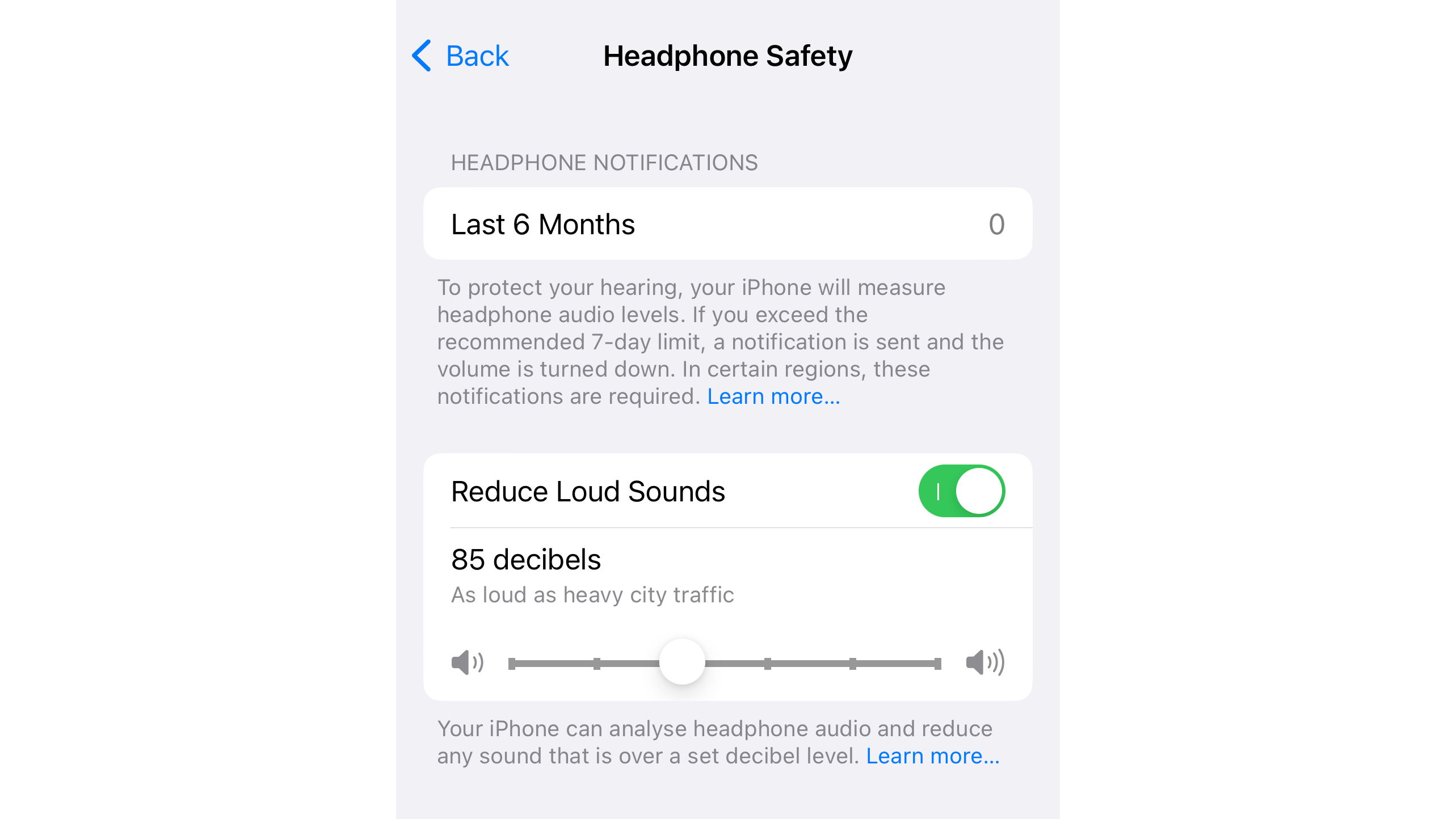
iOS screengrab of volume limiter control

(Image credit: Apple)

For iPhone users, it's very simple – just go to Settings > Sound & Haptics > Headphones Safety, and activate the toggle that says 'Reduce Loud Sounds'. When you turn this one, your phone will give you the option to set the maximum volume coming through your phone.

The default setting was 85 decibels ("As loud as heavy city traffic"), while the minimum option was 75 decibels ("As loud as a vacuum cleaner") and upper limit was 100 decibels ("As loud as an ambulance siren").

85 should be a fine maximum if you listen for only a few hours per day. If you're more hardcore and listen to music for hours and hours, choose 80 decibels.

Sound Check: how to stop sudden spikes in sound
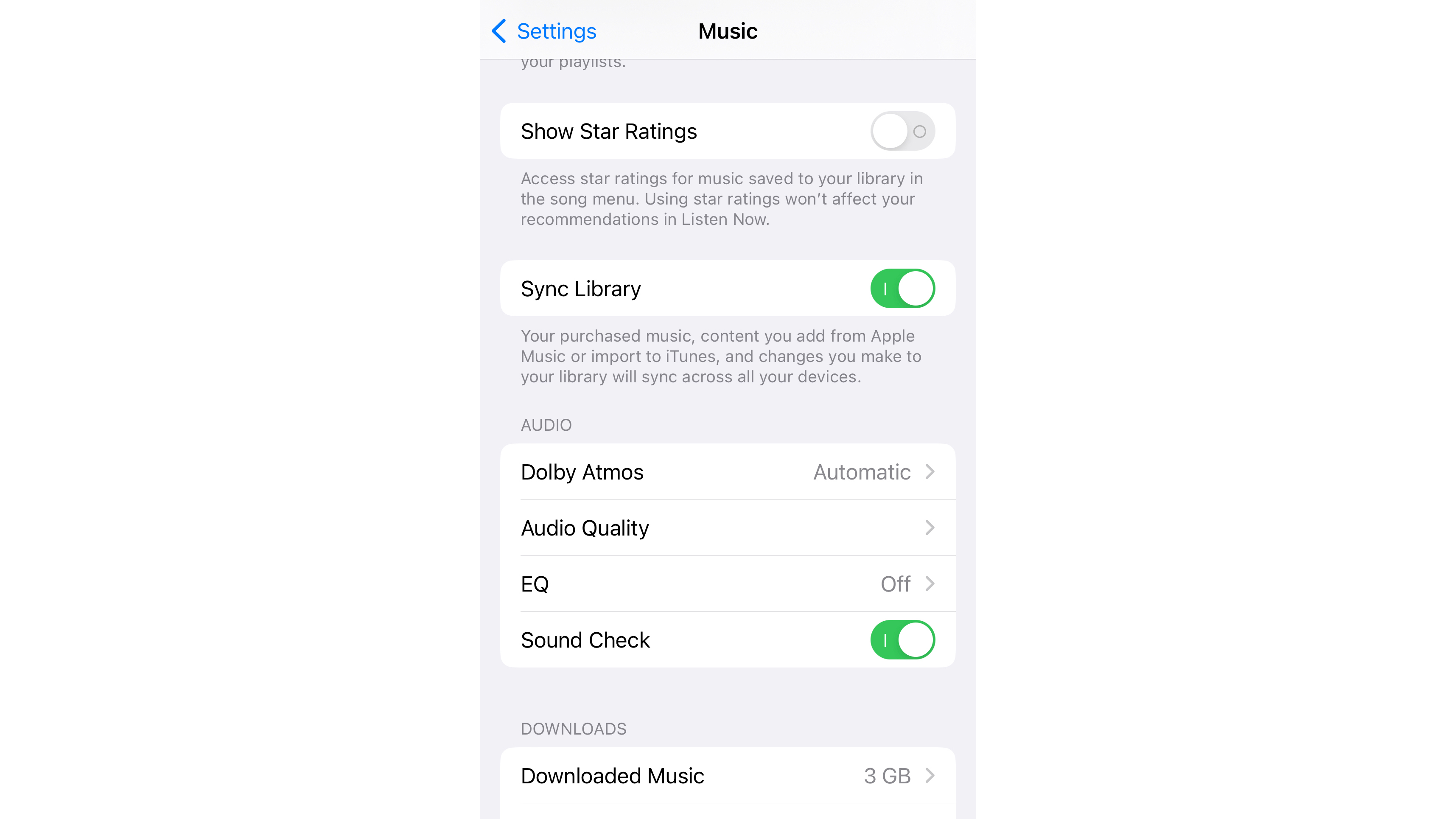
iOS screengrab showing the Sound Check feature enabled

(Image credit: Apple)

There's another setting worth activating for the sake of your hearing – Sound Check.

Sound Check effectively matches differing audio output to the same volume, to prevent sudden spikes in perceived volume when moving from one track to another. It only works in Apple Music, though, so it won't stop, say, a YouTube video being blazingly loud compared to a Spotify track.

You'll find this toggle on your iPhone, if you head to Settings > Music > Sound Check. If you don't have an iPhone, but use Apple Music on other devices, you can head to Music > Preferences > Settings to activate Sound Check there.

It's worth noting that some music streaming services also have settings for normalizing the volume of distinct tracks – in Spotify's case, it's simply called 'Normalize volume' – so do check the settings for any media apps you're using to ensure this is also in play.


Comments

Popular posts from this blog

The latest Apple TV 4K test lets you watch four sports streams at once

Apple is trying something new with the latest beta version of tvOS 16.5: the option to watch up to four simultaneous streams at once. Right now it's limited to live sports streamed through the Apple TV app on the Apple TV 4K , specifically MLB Friday Night Baseball and the MLS Season Pass. A multi-view option was spotted in the tvOS software last month, but the code was hidden and not enabled. MacRumors reported that the feature would be enabled this weekend, and beta testers have since been able to use it. As yet multi-view hasn't been officially announced by Apple, but it's expected that tvOS 16.5 is going to be pushed out in its final form within the next month or so. WWDC 2023 is around the corner as well, when we should be hearing about the next major updates for Apple's various operating systems – including tvOS 17. How it works Over at 9to5Mac there's a hands-on demonstrating how the multi-view feature works, and it's pretty much as you would expe...

Garmin's new radar-equipped tail light will keep you safe on your e-bike

Garmin's Varia bike radars are some of the most popular pieces of cycling tech around – and now the company has delivered its first rearview radar to have been specially designed for some of the best e-Bikes .   Garmin's Varia range mounts to the back of your bike and broadcasts a radar signal behind you, so you can get visual and audible alerts when something's overtaking you. Even better, the new Varia eRTL615 plugs directly into most e-bikes, with no battery required. Because the catchily-named Varia eRTL615 is also a tail light, it'll also make sure you're visible to other vehicles too, promising to emit a flashing or solid light that's visible from up to a mile away in daylight. To connect Garmin's new radar tail light to your e-bike, you'll need to pick the right Garmin adapter cable (which isn't included). You can buy power cables compatible with Bosch, Shimano, or USB-A terminals or connections, with more info on those available on Garmin...

Revolution Software is using their own AI technology to remake Broken Sword

TechRadar Gaming is reporting live from Gamescom 2023 on the latest and greatest developments in gaming and hardware. Revolution Software announced at Gamescom 2023 that Broken Sword would be coming back, with Broken Sword - The Shadow of the Templars getting a full remake while a sixth title in the series is coming in the future too, under the title Broken Sword - Parzival’s Stone .  Speaking to TRG ahead of the announcement, Cecil talked about the studio’s plans for a Broken Sword remake and the sixth title in the series. Cecil is a larger-than-life character, who is able to talk about the studio’s plans with enthusiasm. It even carries a pocketful of stones to illustrate the plans for Parzival’s Stone , but he also talks about how Broken Sword - The Shadow of the Templars would be using AI to upscale.  Cecil wasn’t shy about the studio’s use of AI technology, but he gave a fairly robust explanation of why the game was using it. The AI technology will be used to upda...